Gstore




Pool the free storage of several Google accounts into one drive.
Every Google account comes with 15 GB free. Three accounts is 45 GB — but as three disconnected silos: you have to remember which account holds what, and no single file list spans them. Gstore puts one folder tree over all of them, picks which account each upload should land on, and keeps track of where everything went.
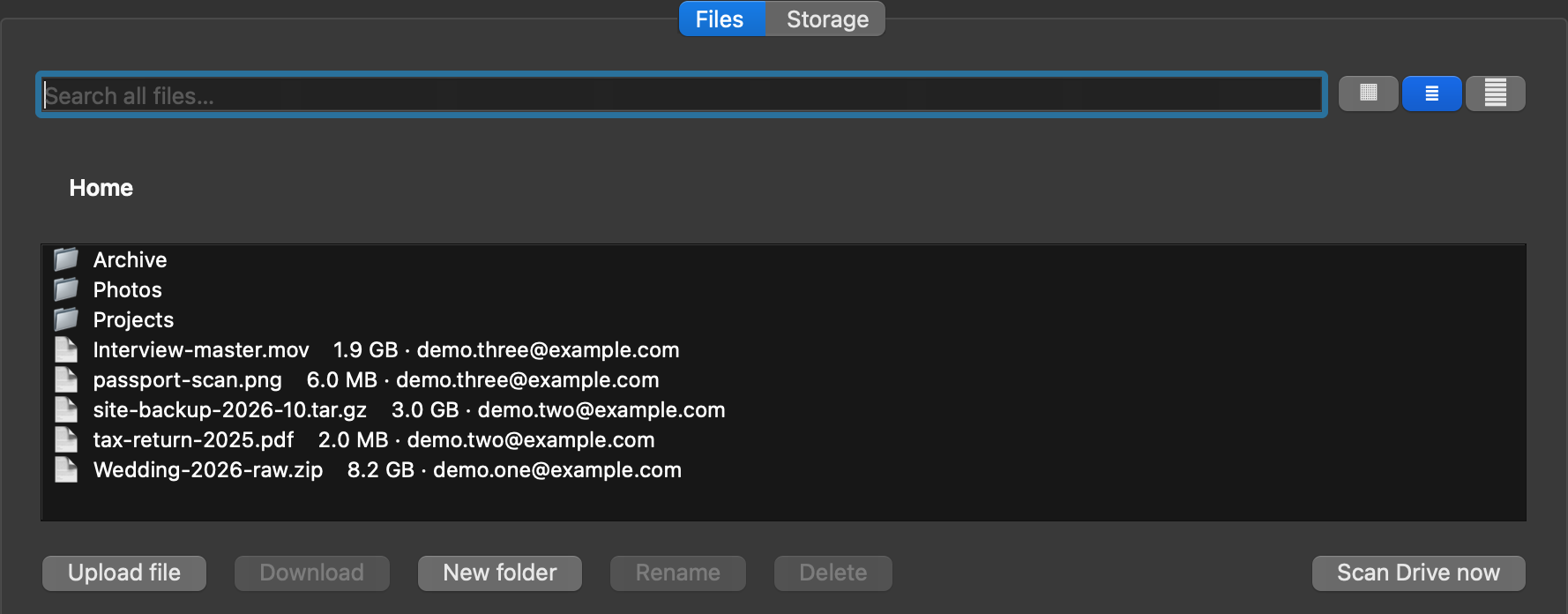
One folder tree. Each row shows which account actually holds the file.
It is a desktop app, and it is local-only. File bytes travel straight between your machine and Google’s servers. There is no Gstore server, no Gstore account, and nothing to sign up for — see the privacy policy.
┌───────────────────── your machine ─────────────────────┐
│                                                        │
│  Gstore — a Qt desktop app                             │
│    ├─ SQLite index ..... the one virtual folder tree   │
│    └─ OS keychain ...... master key for saved tokens   │
│                                                        │
└─────────┬─────────────────┬─────────────────┬──────────┘
          │                 │                 │
      account A         account B         account C
       (15 GB)           (15 GB)           (15 GB)
          │                 │                 │
══════════╧═════════════════╧═════════════════╧═══════════
         Google Drive API — direct, no middleman
Install
Download a build
| Platform | Download |
|---|---|
| macOS (Apple Silicon) | Gstore-macos-arm64.dmg |
| macOS (Intel) | Gstore-macos-intel.dmg |
| Windows 64-bit | Gstore-windows-x64.zip |
Those links always resolve to the newest release. Linux has no prebuilt binary yet — build from source. The Intel macOS build is produced by a best-effort CI job and may be missing from a given release; the Apple Silicon and Intel builds are not interchangeable.
These builds are not code-signed, so the OS will warn you on first launch:
- macOS — the app is blocked the first time. Open System Settings → Privacy & Security, find the notice about Gstore, and choose Open Anyway.
- Windows — SmartScreen shows “Windows protected your PC”. Choose More
info → Run anyway. Unzip first and run
Gstore.exefrom the extracted folder, keeping it next to its files.
macOS asks for your login keychain password once, so Gstore can store its encryption key. Choose Always Allow so it stops asking.
From source
Requires Python 3.11+. Qt arrives via PySide6 as a normal dependency.
git clone https://github.com/Parthivsurya/Gstorage.git
cd Gstorage
python3 -m venv .venv
source .venv/bin/activate        # Windows: .venv\Scripts\activate
pip install -e .
gstore                           # or: python -m gstore
A source checkout cannot sign in on its own. The OAuth client that identifies Gstore to Google is deliberately not in this repository, so the step above gives you an app that raises
ClientSecretsNotFoundthe moment you try to add an account. Supply your own Google Cloud Desktop client first — see Google Cloud project setup. The downloadable builds above already have one baked in.
Adding accounts
Launch Gstore, open the Storage tab and click Add Google account once per account. Your browser opens, you consent with “Sign in with Google”, and the account joins the pool. Repeat for every account you want to pool.
You do not need a Google Cloud project to use a downloaded build — it ships its own OAuth client, so there is no console setup and no JSON to download.
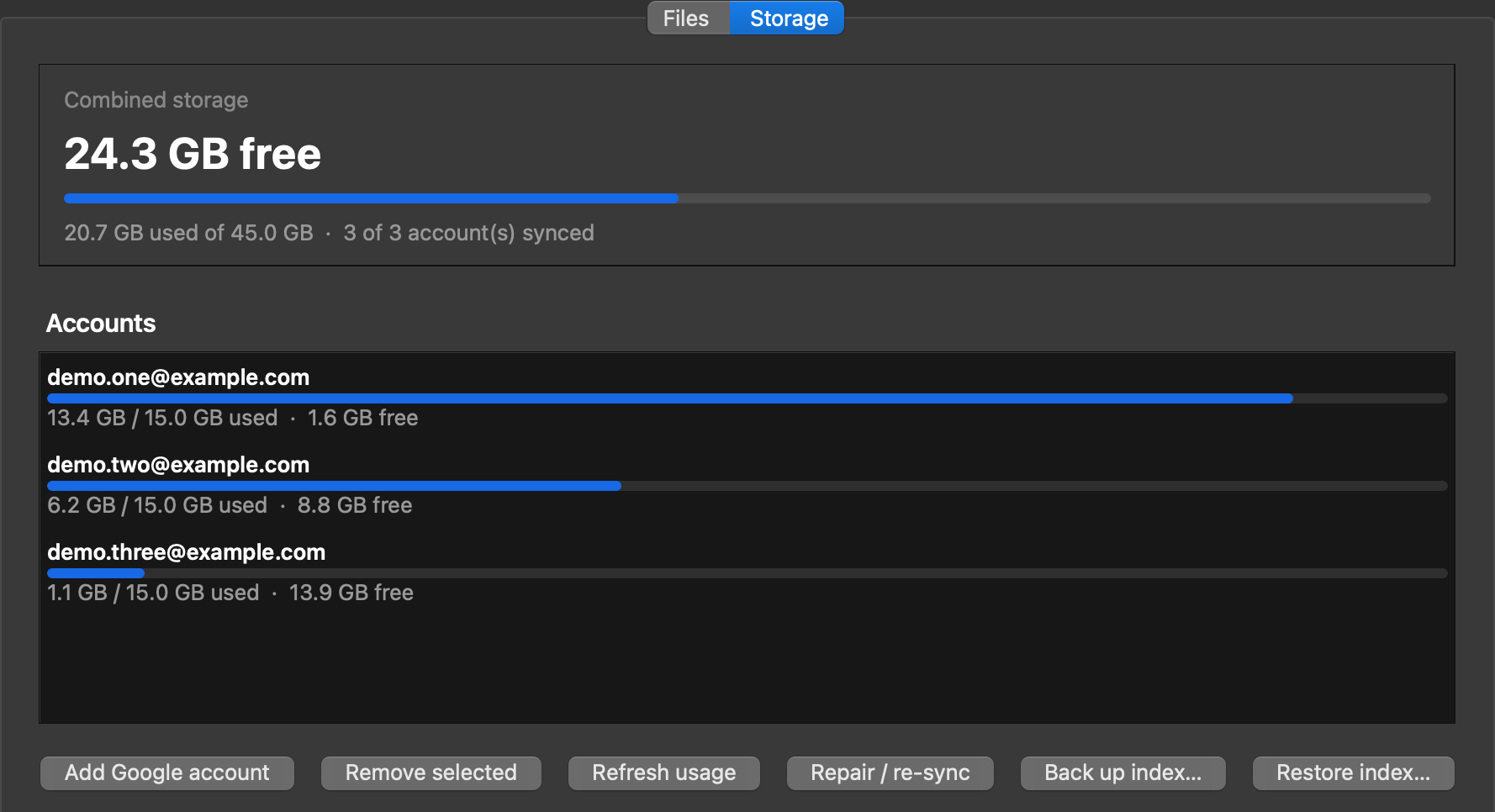
Three 15 GB accounts read as one 45 GB pool, with each account’s own usage below it.
If an account’s access is later revoked or expires, Gstore marks that row “needs re-link” and keeps its files listed rather than hiding them. Clicking Add Google account and signing in as that account again restores access.
How it works
One index, many drives
A local SQLite database is the single source of truth for what you see. It
holds a self-referential folder tree (parent_id, NULL at the virtual root)
plus one row per file recording its name, size, MD5, and which account
physically holds it. The folder tree is purely Gstore’s — it exists in the index
only, so a “folder” can contain files that live on three different Google
accounts.
The database is created on first launch under your OS app-data directory, next to everything else Gstore writes:
| macOS | ~/Library/Application Support/Gstore/gstore.db |
| Linux | ~/.local/share/Gstore/gstore.db |
| Windows | %LOCALAPPDATA%\Gstore\gstore.db |
Choosing where a file goes
On upload Gstore reads each account’s last quota snapshot and picks most-free-first among the accounts the file actually fits in. An account with unlimited storage wins outright; accounts with no quota snapshot yet are skipped.
Whole-file placement is the default on purpose: a file lives entirely on one account, so one lost or locked account can never corrupt files held elsewhere, and Drive’s native preview keeps working.
When a file fits in no single account, Gstore falls back to splitting it into fixed 50 MB chunks spread across several accounts. Chunked files carry no home account; their pieces are tracked individually and the whole-file checksum is kept so reassembly can be verified end to end.
Uploads and downloads
Uploads stream to Drive as resumable transfers with a progress bar. The session URI is recorded in the index keyed to the local file’s identity (path + size + mtime), so an upload interrupted halfway resumes where it stopped rather than starting over — and any edit to the file invalidates the stale session. Chunked uploads track completed chunks the same way and resume from the first missing one.
Content MD5 is checked against Drive’s own md5Checksum when a file goes up,
and the written file is verified again on the way back down.
Every Drive API call is funnelled through one retry wrapper that backs off
exponentially on 429, 500, 502, 503, and on 403 rateLimitExceeded /
userRateLimitExceeded — so a rate limit slows a transfer down instead of
failing it.
Keeping the index honest
Because the index is a cache of someone else’s state, it can drift: you might delete a Gstore file from the Drive web UI directly. Repair / re-sync on the Storage tab walks each linked account and reconciles both directions — pruning index rows for files that no longer exist, and recovering Gstore files that exist on Drive but went missing from the index.
Deleting a folder spans accounts, and partial failures are reported rather than silently swallowed.
Browsing
The Files tab renders the virtual tree with breadcrumb navigation, in three view modes — List (detailed rows), Grid (wrapping icons), and Gallery (large tiles that fill in with real Drive thumbnails, fetched on a background thread). You can upload, download, rename, delete, and create folders from here.
Scan Drive now is different: instead of reading the index, it queries every linked account live and shows one combined listing of all their files, including files Gstore never created. This needs the opt-in whole-Drive permission described below. Deleting from a scan moves the file to Drive’s Trash, where it stays recoverable — it is not a permanent erase.
Credentials
Google refresh tokens are serialised, Fernet-encrypted, and stored in the
local database. The master key is never on disk: it lives in your OS keychain
(Keychain on macOS, Credential Manager on Windows, Secret Service on Linux) via
keyring, fetched once per process. Access tokens refresh automatically.
What Gstore can see
Gstore asks for the narrowest permission that makes the feature you are using work.
| Scope | When | What it allows |
|---|---|---|
drive.file |
Always | Only the files Gstore itself created. Enough for pooled storage totals, uploads, downloads, and managing Gstore’s own files. Not a restricted scope. |
drive |
Opt-in only | Full Drive access, needed for the combined Scan Drive now view over files Gstore did not create, and for trashing one of them. |
The full drive scope is restricted by Google: it is granted only to a
verified app holding a current CASA security assessment. Requesting it from
every user would put an “app not verified” wall in front of everyone, so Gstore
does not ask for it by default. Enable it with the GSTORE_FULL_DRIVE
environment variable (development) or by creating a full_drive.enabled marker
file in the app-data directory.
Scope changes only affect accounts linked afterwards. An existing token keeps whatever it was granted until you re-link that account — Add Google account again, signing in as the same account — so until then an older account still shows only its Gstore files in a scan and cannot trash anything else.
Gstore makes no network requests to anywhere but Google. For what is stored and what is not, see PRIVACY.md.
Project layout
src/gstore/
  app.py              entry point — opens the DB, launches the window
  config.py           app-data paths, opt-in whole-Drive flag
  format.py           human-readable byte sizes
  auth/
    oauth.py          PKCE loopback sign-in, scope sets
    accounts.py       linked-account records
    keystore.py       Fernet master key, held in the OS keychain
  db/
    database.py       SQLite connection + schema bootstrap
    schema.sql        accounts, folders, files, uploads, chunks
  drive/
    placement.py      which account a file goes to; chunk planning
    upload.py         resumable upload
    download.py       download + checksum verify
    chunk_upload.py   split an oversized file across accounts
    chunk_download.py fetch the pieces back and reassemble
    browse.py         live multi-account listing ("Scan Drive now")
    delete.py         Drive-side delete / trash
    quota.py          about.get storage snapshots
    hashing.py        MD5 integrity checks
    rate_limit.py     exponential-backoff retry wrapper
    reconcile.py      index <-> Drive repair
  index/
    store.py          index reads and writes
    uploads.py        in-flight resumable upload sessions
    pending_chunks.py which chunks of a chunked upload already landed
    backup.py         index backup
  ui/
    main_window.py    Files / Storage tabs
    file_browser.py   virtual tree, List / Grid / Gallery
    storage_panel.py  pooled totals, Add Google account, Repair / re-sync
    account_row.py    one account's usage bar and re-link notice
    *_worker.py       one QThread worker per long Drive operation
tests/                pytest suite
packaging/            PyInstaller spec, icon and DMG builders
docs/                 historical implementation plan
Development
pip install -e ".[test]"
python -m pytest -q
Long Drive operations each run on their own QThread worker so the UI never
blocks; src/gstore/ui/*_worker.py is the pattern to copy when adding one.
Maintainers
Bundling the OAuth client
The shipped client lives at src/gstore/auth/client_config.json. It is a
Desktop (PKCE) client with no confidential secret to protect, but the file is
gitignored so real credentials are never committed. Inject it at build time:
cp /path/to/client_secret.json src/gstore/auth/client_config.json
CI does this from the GSTORE_CLIENT_CONFIG repository secret. Without it the
built app raises ClientSecretsNotFound and nobody can sign in.
To point Gstore at a different project without touching the package:
export GSTORE_CLIENT_SECRETS=/path/to/client_secret.json
# or drop it at the app-data path:
cp /path/to/client_secret.json \
   "$HOME/Library/Application Support/Gstore/client_secret.json"
Resolution order: GSTORE_CLIENT_SECRETS → app-data client_secret.json →
bundled client.
Google Cloud project setup
- Create a project at https://console.cloud.google.com and enable the Google Drive API.
- Configure the OAuth consent screen (External). Publish to In production so refresh tokens don’t expire and there is no test-user cap.
- Create an OAuth client ID of type Desktop app and download its JSON.
Releasing
PyInstaller bundles the host’s Python and Qt and cannot cross-compile, so every platform is built on its own runner. Push a version tag:
git tag v0.0.6 && git push origin v0.0.6
.github/workflows/release.yml then builds each platform, runs the tests, and
publishes a GitHub Release with version-less asset names, so the
releases/latest/download/... links above never break.
Publishing docs
This branch is served by GitHub Pages from the repository root, so Jekyll turns
every tracked .md into a public page. _config.yml carries an explicit
exclude: list and only this README and PRIVACY.md are public. Any new
Markdown file is public unless you add it there.
Status
v1 is feature-complete. Multi-account sign-in, pooled storage totals, the unified folder tree, smart-placement uploads, downloads, deletes across accounts, index repair, chunking for oversized files, and the live combined Drive scan all work. Current version: 0.0.5.
Still ahead:
- Code signing and notarization, so first launch stops warning.
- Google OAuth verification + CASA assessment, to make the whole-Drive scan available without the opt-in flag.
- A FUSE mount, exposing the pool as a real filesystem.
The original design document, including the reasoning behind the early decisions and the parts that did not survive contact with reality, is kept at docs/implementation-plan.md.
Licence
Copyright © 2026 PKB. All rights reserved — see LICENSE.
The source is public so it can be read and audited, which matters for an app that asks for access to your Google Drive. That is the only thing publishing it grants. It is not open source: no permission is given to use, copy, modify, redistribute or sell Gstore or any part of it. If you want to do any of those, ask.
The build instructions above are provided for the copyright holder and for anyone who has been granted permission. Third-party dependencies (Qt/PySide6, the Google client libraries, and the rest) keep their own separate licences.